11 min read
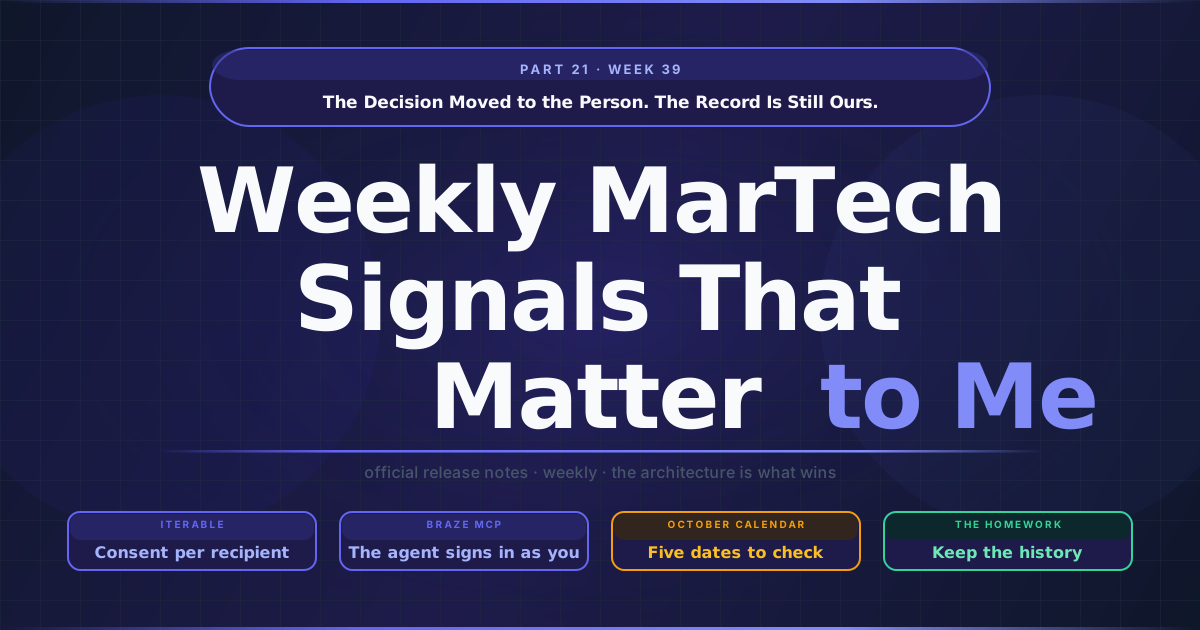
The Decision Moved to the Person. The Record Is Still Ours.
Every consent audit I have sat through ends on the same question, and it is never the one the team prepared for. Nobody asks whether the consent banner was compliant or whether the preference center worked. They ask what, exactly, we knew about this person at the moment we sent this message, and whether we can prove it. Two of the platforms I run in production shipped changes that make that question easier to answer at the moment of action and, in my reading, harder to answer afterwards.
TL;DR
- Iterable made the open-tracking pixel a per-recipient consent value. With the new project setting on, marketing email carries the pixel only when
emailTrackingPixelConsentis exactly boolean true, a missing value counts as a refusal, and Iterable keeps only the current value. - Braze’s remote MCP server is generally available, and the agent signs in as you. OAuth replaces the API key, access is bounded by the dashboard user’s permissions, and it ends when that user loses access in Braze.
- Both changes move a shared control to one person, evaluated at the moment of action, and both leave the history to you. A consent ledger for the pixel, and a record of role and group membership over time for agent access.
- October is a calendar. Marketo’s error 1003 from 30 September, Journey Optimizer’s dataset TTL guardrail from 1 October and its Audience Composition stop at the end of the month, and the Garante’s open-tracking term on 29 October.
The tracking pixel becomes a field on the profile
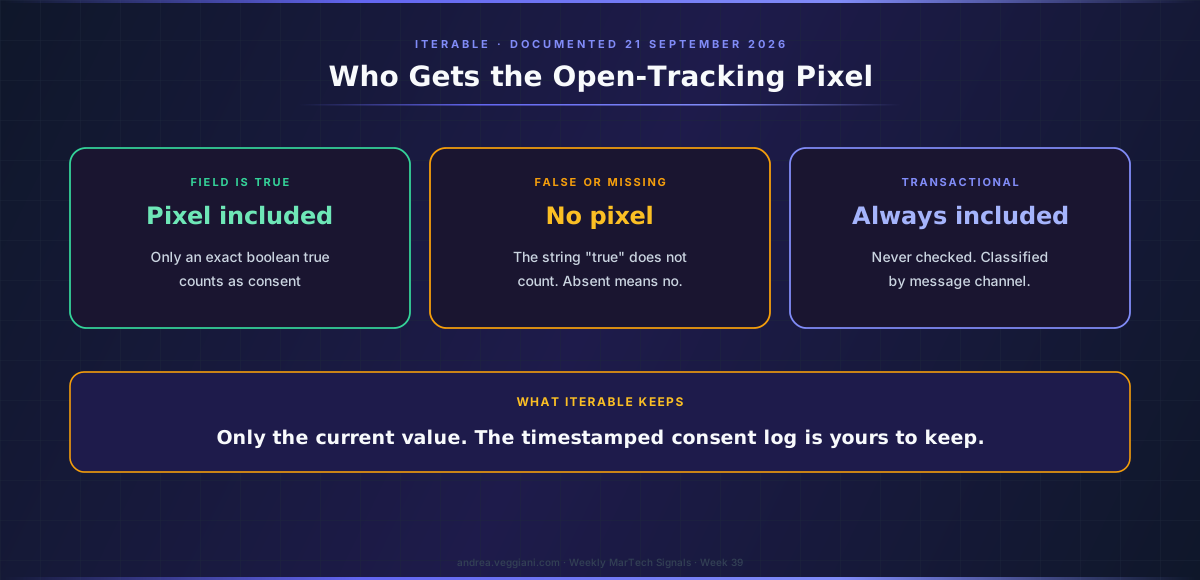
Iterable documented user-level tracking-pixel consent on 21 September, for availability in early October. The mechanism is simple and the detail is where the value sits. A project setting called Use consent-based open tracking changes how Iterable decides whether to inject the open-tracking pixel into an email. With it on, a marketing email carries the pixel only when a system-defined boolean on the recipient’s profile, emailTrackingPixelConsent, is true. The documentation is precise about what true means: “Iterable treats only an exact boolean true as consent”, so the string “true” does not count, and a missing value is treated exactly like a refusal.
That last property is the design choice I would underline for anyone planning the rollout. When the field is absent, the pixel is absent, which means the system fails towards not tracking. Iterable says so in its own warning to administrators: turn the setting on before consent values are loaded and marketing emails will omit the pixel for every user whose field is false or missing. The order of operations matters more than the switch itself.
Three other details decide how this behaves on a real stack. Transactional email is never checked and always carries the pixel, and Iterable classifies a send as marketing or transactional by the message channel, not by the campaign name or the template. A team that routes promotional content through a transactional channel for deliverability reasons will get the pixel on those sends regardless of the recipient’s value, and Iterable’s documentation is explicit that the regulations may still apply. Iterable does not collect consent and does not backfill it; the value arrives through the same profile-update paths as any other attribute. And Iterable stores only the current value, with a direct instruction to anyone who needs more: “maintain a timestamped consent log in your own systems.”
The context is why this lands now. Iterable’s compliance section cites guidance from the CNIL in France and the Garante in Italy that separates consent to receive marketing email from consent to be tracked by a pixel, and the Garante’s compliance term for existing open-tracking practices falls on 29 October. The record has logged a sequence of vendor controls for this, from Adobe Campaign’s Web UI open-tracking toggle and Klaviyo’s click-tracking management to per-business-unit switches in Salesforce’s Account Engagement, all listed with their dates in the Week 39 MarTech Watch. Those are switches at the level of a workspace, an account or a business unit. Iterable is not the first of the nine to go further. Insider One already documents the same design in its academy, on a page last updated on 3 September: an account-level Pixel Tracking Opt-in setting in Email Settings turns on send-time enforcement, every promotional email, standalone or Architect, then reads the recipient’s email_pixel_tracking_optin attribute, and a null value is treated as a refusal. That makes two of the nine that key the pixel to a value on each recipient’s own profile, with the same default when the value is missing, and in my reading that convergence says more about where consent is heading than either release does alone.
The agent signs in as you
Braze’s 17 September release, which published after last week’s edition was compiled, moved its remote-hosted MCP server to general availability. The release note describes it in one sentence that carries the whole design: access “is limited by the signed-in user’s permissions and OAuth scopes”, with no local package, no configuration file and no API key.
The MCP documentation fills in what that means operationally. You connect a supported client with a URL and sign in with your Braze account, and “If a dashboard user loses access in Braze, the client loses access too.” The locally hosted server released in August 2025 is deprecated. Tools that expose user-level PII are not available at all, so the agent works on aggregates, configuration and content. The tool surface itself has not changed since the table recorded in Week 37: Braze’s own Access column marks 34 of its 71 tools as create, update, delete or write, and a subset, including launching and stopping campaigns, is available only to customers in beta programs.
Two lines in the documentation matter for rollout planning more than the announcement does. Customers that use IP allowlisting cannot use the remote server yet, which rules it out for some enterprise stacks until that changes. And Braze’s legal disclaimer says that it “does not see your original natural-language prompt”, receives the tool call exactly as the client’s model formulated it, and recommends against using a client’s auto-mode for actions. The platform enforces who you are and what you may do; the client decides whether a person reviews each action before it runs.
Braze pairs this with a quieter item in the same release: SCIM provisioning that syncs groups from Okta and Microsoft Entra ID to Braze custom roles. Read together, the identity an agent inherits is now the identity your identity provider manages, which, in my experience, is the arrangement security teams ask for first.
One design, and the homework it creates
On the surface these two changes have nothing in common. One is about the customer, the other about the operator. One lives in the email render pipeline, the other in an authentication flow. But they make the same decision, and it is worth naming because it will recur across the rest of the stack.
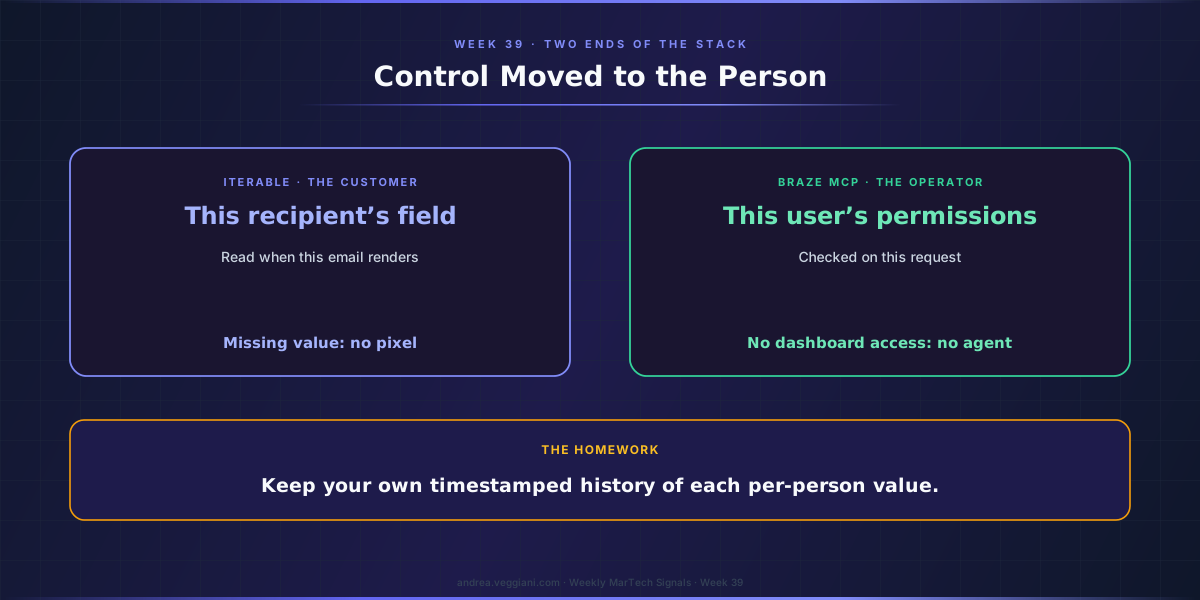
Both replace a shared, coarse-grained control with a value that belongs to one person and is evaluated at the moment of action. The pixel now depends on this recipient’s field, read when this email renders, with the project setting acting only as the master switch. The agent depends on this operator’s dashboard permissions, checked on this request, where it used to depend on an API key with fixed scopes. And in both cases the safe outcome is the default when the value is missing: no consent field, no pixel; no dashboard access, no agent.
That is the right direction, and I would not argue against either implementation. What it changes, in my reading, is where the evidence lives. When control was coarse, the evidence was coarse too, but it was stable: a project setting has a change log, an API key has a creation date and a scope. When control is per person and evaluated at render or request time, the question an auditor asks becomes “what did this person’s value say at that moment”, and the platform is not necessarily the system that can answer it. Iterable says so explicitly for consent. For agent access, the question of which dashboard permissions a user held on the day a tool call ran depends on how permission changes are logged, which each vendor handles in its own way and which the MCP server documentation does not address.
So the homework is the same for both. Keep your own history of the per-person value, with timestamps, in a system you control: a consent ledger for the pixel, and for agent access, a record of role and group membership over time that your identity provider may already hold if you ask it to. The platforms have moved the decision to the individual. The record of that decision is still ours to keep.
Two new ways a journey can quietly misbehave
Adobe’s September wave for Journey Optimizer, published across the release notes, contains one capability I have wanted for years and two behaviours I would add to every operations runbook.
The capability is Compare journey versions in CX Enterprise Coworker, which returns what Adobe calls “a full-fidelity, structured diff” between any two versions of a journey: nodes added, removed, modified or moved, field-level detail, changed connections and journey-level properties, without opening the canvas. Release management on complex journeys has always relied on screenshots and memory. A structured diff is something an approver can sign.
The first behaviour is the new trigger after batch audience evaluation. A recurring journey on a batch audience can now wait up to six hours for a fresh evaluation, and if none arrives, that occurrence is skipped. Sending to yesterday’s audience was the old failure. A skipped run is a new one, and it does not look like an error unless you are watching for it.
The second is still in the Coming soon section, so it may change: an automatic event recovery timeout that, by default, replays impacted journey events for up to 72 hours after a service interruption, with a setting to shorten the window for time-sensitive journeys. Replay is the right default for resilience. It also means a journey can act on an event that is almost three days old unless someone has decided otherwise for that journey. For a price alert or an abandoned-cart message, that decision belongs in the runbook before the next incident.
The October calendar
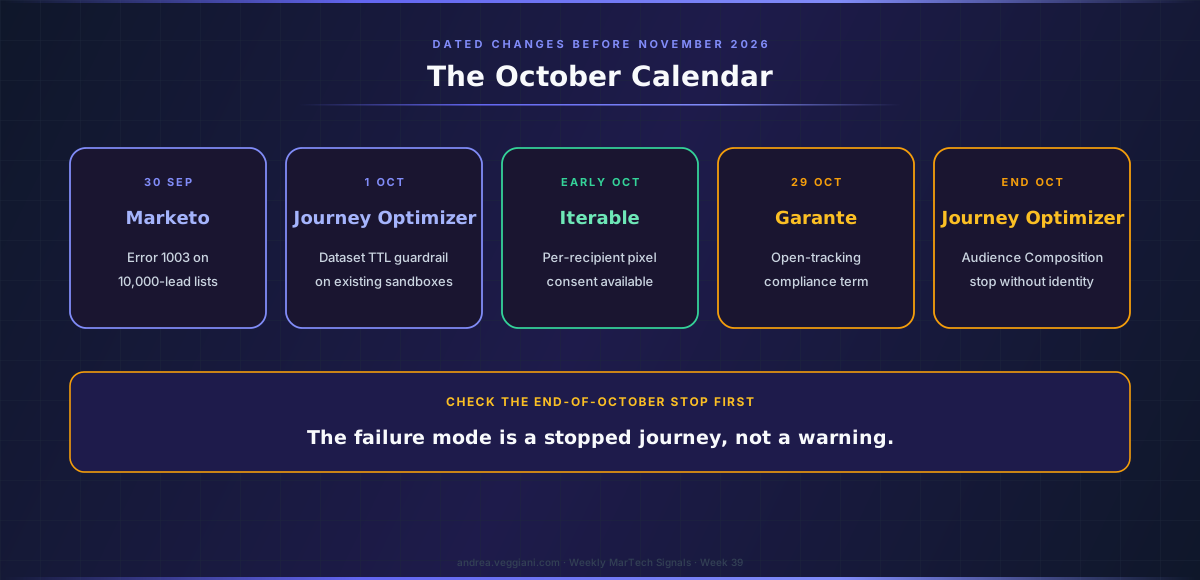
What makes this autumn unusual is the number of dated changes due before November for teams running these platforms in Europe. Marketo’s static-list limit on the Get Lead Activities and Get Lead Changes endpoints starts returning error 1003 at 10,000 leads from 30 September. Journey Optimizer enforces its dataset time-to-live guardrail on existing sandboxes from 1 October. Iterable’s pixel consent becomes available in early October. Adobe states that during the October release, at the end of the month, Journey Optimizer will stop journeys and campaigns that use an Audience Composition audience whose source dataset has no primary identity descriptor, which is the one on this list I would check first, because the failure mode is a stopped journey rather than a warning. And the Garante’s term for email open tracking falls on 29 October.
Further out, Marketo has set an end for its Classic interface: the New UI reaches general availability by the end of September and the ability to select the Classic UI remains through the January 2027 release. Nothing here is dramatic. Together it is a calendar, and calendars are what slip when every team assumes another team is tracking them.
What the quadrant is scoring now
The 2026 Gartner Magic Quadrant for Multichannel Marketing Hubs was published with a report date of 22 September, and Braze announced that it is a Leader for the fourth consecutive year, positioned highest for Ability to Execute and furthest for Completeness of Vision. I have not verified the other vendors’ positions yet and will not characterise them here.
I read these reports for the criteria more than for the dots, and the Critical Capabilities companion is usually the more useful document in a selection process because it scores vendors against specific use cases. My expectation, since I have not read the report in full, is that governance of agent access sits closer to the centre of this year’s evaluation than it did two years ago. If it does, the questions in this essay are the ones a buyer should be bringing to every vendor on the shortlist: when the control moves to the individual, where does the history of that individual’s value live, and who can produce it on the day it is asked for.
The platforms have moved the decision to the person. Keeping the record of that decision is still our job.
Sources
Iterable
- 2026 Release Notes. Source for the tracking-pixel consent entry of 21 September and its early-October availability.
- Email Open Tracking: Control open tracking with user-level consent. Source for the project setting, the exact-boolean rule, transactional classification by channel, the absence of backfill and history, the timestamped-log instruction, and the CNIL and Garante references.
Insider One
- Email Open Tracking Consent. Source for the account-level Pixel Tracking Opt-in setting, the
email_pixel_tracking_optinattribute, null treated as refusal, the scope of promotional and Architect email, and the CNIL and Garante timing.
Braze
- September 17, 2026 release. Source for the MCP server GA, SCIM provisioning for IdP groups and the Operator and SDK items.
- About the Braze MCP server. Source for OAuth sign-in, loss of access with the dashboard user, the deprecated local server, the PII exclusion, the IP allowlisting limitation and the legal disclaimer on prompts and auto-mode.
- Available API functions in the Braze MCP server. Source for the 71 tools, the 34 marked create, update, delete or write in Braze’s Access column, and the beta-program tools.
- Braze named a Leader in the 2026 Gartner Magic Quadrant for Multichannel Marketing Hubs. Source for the placement, published 24 September 2026, and the report date of 22 September.
Adobe
- Journey Optimizer release notes. Source for Compare journey versions, trigger after batch audience evaluation, the Coming soon event recovery timeout, the Audience Composition stop and the dataset TTL guardrail.
- Marketo Engage current release notes. Source for the New UI and Classic UI dates and the static-list limit.
The record
- MarTech Watch, Week 39. Every date, status and vendor control referenced in this essay, including the earlier tracking switches at Adobe Campaign, Klaviyo and Salesforce Account Engagement.
- MarTech Watch, Week 37. The first count of the Braze MCP tool table.
The digest behind each weekly article is produced through a structured AI-assisted scan of official release notes and product update sources. I review the output, verify the relevant signals and write the architectural interpretation.
This article draws from the Martech Weekly Digest scans run on September 24, 2026, covering 18 to 24 September across several CEP platforms and vendors. The dated record behind it is in MarTech Watch, Week 39.
If you find errors or gaps in coverage, I want to know. The process improves when the output is challenged.