Every vendor in the chain told the truth about being real-time. The customer still got the message forty minutes late, because nobody had added the numbers up.
Take an illustrative case that will be familiar to anyone who has run a retail CRM programme. A customer browses on a phone, logs in, adds a jacket to the cart and leaves. The business wants a reminder within about half an hour, so the journey has a thirty-minute wait built in, and the CDP, the CEP and the mobile SDK in the architecture are all sold and documented as real-time. The reminder arrives seventy minutes after the customer left. When the team looks for the problem, every component turns out to be working as specified. The SDK sent the event within seconds. The CDP ingested it as a stream. The audience the journey listened to, however, combined the cart event with a loyalty tier stored as a profile attribute, which made it a batch audience that refreshed on a schedule. The audience was then exported to the CEP on another schedule, the journey’s own wait started only when the profile arrived, and the send went out in the next throttled batch.
Nothing in that chain is broken, and that is the point. The customer experiences the sum of several clocks, while each product reports only its own, and the word “real-time” in a contract describes one stage at best. The thesis of this article is simple enough to quote: real-time behaviour is a property of the whole path from event to message, and the only reliable way to get it is to write a latency budget for each use case and check every stage against it.
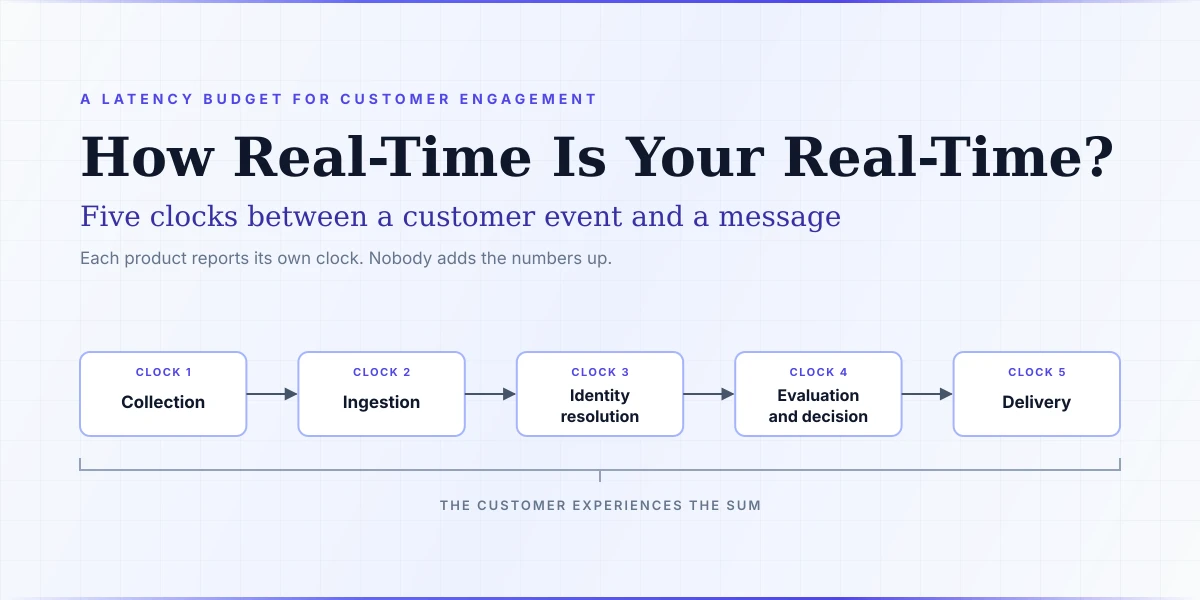
Five clocks between a customer event and a marketing message
The path from a customer’s action to a message has five stages, and each one has its own clock that someone chose, often without knowing they were choosing it. Stream-processing engineers named the underlying gap a decade ago: event time, when something actually happened, against processing time, when a system observed it, the distinction Tyler Akidau set out in Streaming 101 and in the Dataflow Model paper he co-wrote at Google.
The first is collection. A mobile or web SDK does not usually send every event the instant it happens, because batching saves battery and network, so events wait in a local queue until a flush interval or a session boundary. The defaults are documented: Google’s Firebase Analytics batches app events over roughly an hour before uploading them, to save battery and data, and Segment’s Swift library flushes by default once twenty events have queued or its flush interval runs out. Server-side events from commerce or order systems have their own path, often through a message bus, and sometimes through a file.
The second is ingestion, the point at which the event lands in the platform that will use it. Streaming ingestion is fast but rarely instantaneous for every downstream use, and the same event may be available to one service in seconds and to another, such as the data lake, much later. Adobe’s ingestion guardrails, for example, state that it can take up to sixty minutes for streaming data to be completely processed to the data lake, and set separate throughput limits for streaming into the profile store and into the lake.
The third is identity resolution, the step that decides which customer the event belongs to. An event from an anonymous device has to be stitched to a known profile before any journey that targets known customers can react to it, and stitching rules, merge policies and the timing of the login event all affect when that happens. Identity resolution is usually discussed as a question of accuracy, and it is also a question of time.
The fourth is evaluation and decision, where the platform decides that this customer now qualifies for this audience or journey and chooses what to do. This is where the difference between batch and event-driven architectures stops being abstract, because an audience that is evaluated on a schedule will only ever be as fresh as its schedule, however fast the event arrived. The decisioning step adds its own time if it calls a model, a recommendation service or an external lookup.
The fifth is delivery, which includes the journey’s own waits, rate limits and throttling, quiet hours, the channel provider’s queue and the push or email infrastructure beyond it. Some of this time is deliberate and some is not, and the deliberate part is often the largest single number in the budget.
What vendors document when they say real-time
Vendor documentation is usually more precise than vendor marketing, and reading it carefully is the cheapest latency audit available. Adobe Experience Platform is a good example because it documents three evaluation methods separately. Streaming segmentation evaluates audiences in near real time as streaming data lands, but only for specific query patterns: a single event, or several events, within a relative window of under twenty-four hours, optionally combined with profile attributes. Audiences built only on profile attributes, multi-entity queries, references to other segments in certain combinations and event windows longer than a day all fall back to batch evaluation. Edge segmentation evaluates certain audience types instantly on the Edge Network for same-page and next-page personalisation, with its own eligibility rules and the note that first calls can hit cold-start latency. Batch segmentation runs on a schedule.
Adobe is not an outlier. Salesforce documents the same trade-off in Data 360 under other names: standard segments publish on a schedule, for example every twelve or twenty-four hours, while Rapid Publish refreshes every one or four hours and evaluates only the last seven days of engagement data.
Adobe also publishes a set of observed latency diagrams for the edge, ingestion, segmentation and Journey Optimizer paths in its implementation guardrails, and states that these guardrails are not intended to be service level agreements. Braze takes a similar line on delivery: its pre-send guidance for SMS states that it does not commit to sending-speed SLAs contractually, citing traffic congestion and carrier issues. These are honest positions, and a buyer should take the same one. The figures describe how the platform behaves, the audience design decides which path a use case takes, and the contract rarely guarantees either.
The same reading exercise applies to every CEP and CDP on a shortlist. The questions are the same in every case: which audience definitions are evaluated on events and which on a schedule, what happens when one condition in a rule is batch-only, how often audiences are exported to downstream destinations, and how quickly a profile update reaches an active journey. Most vendors answer those questions accurately when asked in writing, and very few volunteer the answers in a demo.
Where the minutes hide: identity, exports and throttling
In my experience the largest delays rarely sit inside a single product. They sit in the junctions between products, where each side meets its own promise and the handover runs on a schedule that nobody owns.
The first junction is identity. An anonymous browsing session that becomes a known customer at login produces a merge, and depending on the platform and the merge policy, events captured before the merge may or may not be visible to a journey that starts after it. The cart example above fails here as often as anywhere else, because the cart was built while the customer was anonymous.
The second is the audience export. When the CDP and the CEP are separate products, audiences usually move between them through a destination or a sync job with a refresh interval, and that interval is frequently set during implementation to balance cost against freshness and then forgotten. The CDP–CEP architecture patterns decide how many of these handovers exist in the first place, and a stack with three of them has three schedules in its critical path.
The third is the warehouse. In composable and zero-copy architectures the warehouse defines the audience, which is the right place for most analytical logic and a slow place for anything that must react to a single customer within seconds. The separate problem of querying the warehouse at runtime, with its cold starts and concurrency limits, is the subject of Zero-Copy at Runtime: The Millisecond Wall; for the latency budget it is enough to know which audiences depend on a warehouse sync and how often that sync runs. The schedule is usually a setting: Braze’s Cloud Data Ingestion, for instance, syncs from Snowflake, BigQuery, Redshift, Databricks or Fabric on a schedule set per integration, as often as every five minutes or as rarely as once a month, or on demand through its API.
The fourth is the send itself. Rate limits protect deliverability and downstream systems, frequency caps protect the customer, and both turn a burst of qualifying customers into a queue. Throttling is usually the right decision, and deliverability work starts well before the send, but it belongs in the budget as a number.
Set the budget backwards from the use case
A latency budget works the same way a performance budget works in web engineering. You start from the experience the customer should have, decide how much delay that experience can tolerate, and allocate the tolerance across the stages before you build. Then you check each stage’s documented behaviour against its allocation, and the stage that cannot meet it is your design problem. Google’s web.dev guidance defines a performance budget as a set of limits on the metrics that affect site performance and advises setting it early, so the team does not have to backtrack later. Site reliability engineering applies the same discipline to data: the example SLO document in Google’s SRE Workbook measures a pipeline by freshness, the share of records updated within a stated interval, which is exactly the kind of number every stage of a latency budget needs.
The tolerance depends on the use case, and most programmes fall into four tiers. In-session personalisation, such as changing what the next page shows after a click, tolerates milliseconds to a second and normally needs evaluation at the edge or inside the session itself, never a round trip through a central profile and a scheduled audience. These limits are older than any marketing stack: Jakob Nielsen’s thresholds of a tenth of a second for a reaction that feels instant and one second for an uninterrupted train of thought date from 1993 and still hold. Transactional and service messages, such as order confirmations or one-time codes, tolerate seconds and usually belong outside the marketing stack altogether, on a direct integration with a transactional sender. Behavioural triggers, such as cart, browse and price-drop reminders, tolerate minutes, and this is the tier where the hidden schedules do the most damage because the use case looks fast and the audience design quietly makes it slow. Lifecycle and relationship programmes, such as onboarding sequences, win-back and replenishment, tolerate hours, and building them on the fastest path only adds cost.
The budget also needs two separate lines for delay. Designed delay is the wait the business chose because the customer experience is better with it, such as giving someone half an hour to finish a purchase before reminding them. Accidental delay is everything else, the export interval, the batch fallback, the merge timing. A thirty-minute designed wait on top of forty minutes of accidental delay is a seventy-minute experience, and a team that only sees “seventy minutes” in the reporting cannot tell which half to fix.
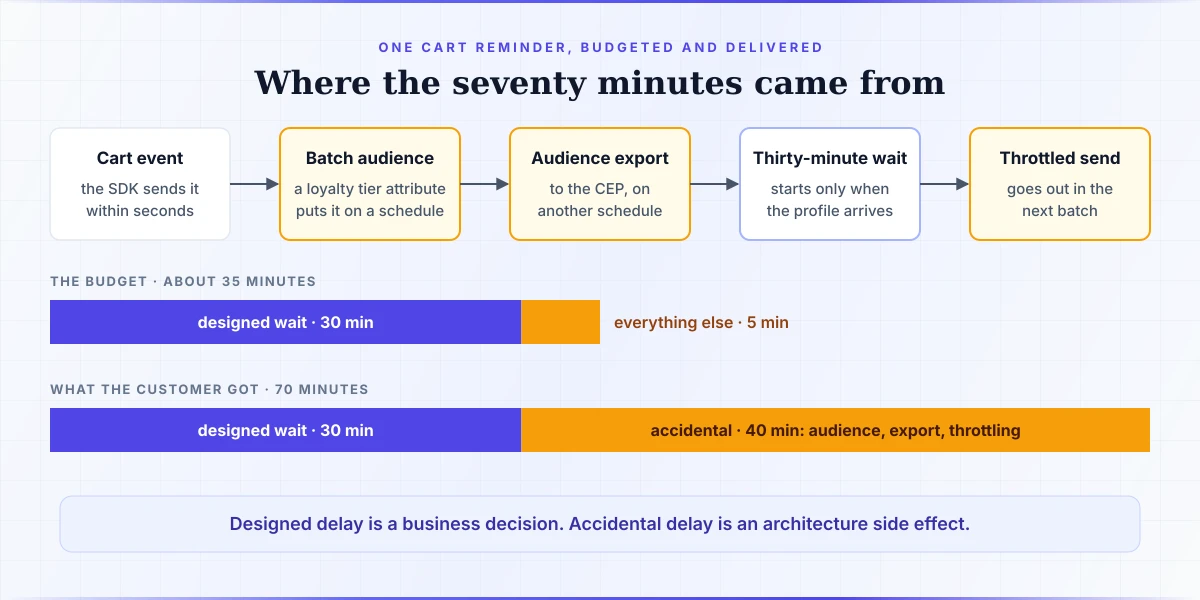 Figure 1. The jacket reminder as a budget: the designed wait was the same in plan and in production, and the forty accidental minutes came from the batch audience, the export and the throttled send.
Speed has a cost, and the budget is also how you decide where to pay it. Streaming evaluation, edge activation, shorter export intervals and runtime lookups all consume more compute and more licence capacity than their scheduled equivalents, and the case for paying is strongest where a minute of delay visibly changes the outcome. For the large majority of journeys in a typical programme, a well-designed hourly path is cheaper, simpler to operate and indistinguishable to the customer.
The second latency: how fast the rules change
Everything above concerns the first latency, the time between a customer doing something and the stack responding. There is a second one that is usually slower and less often measured, the time between a business deciding that a journey should behave differently and that change running in production. A stack that reacts to events in seconds and needs three weeks and a sprint ticket to change a waiting window is, in practice, a slow stack, because the moment that needed the change has passed by the time it ships. That argument belongs to the operating model as much as to the architecture, and it is part of why business autonomy was never just a UI problem.
Back to the jacket. With a budget, the team would have written down a target of around thirty-five minutes from abandonment to reminder, allocated thirty of them to the designed wait and five to everything else, and then discovered during design, before anything reached production, that the loyalty-tier condition pushed the audience onto a scheduled path. The fix is small once it is visible: evaluate the cart event on the streaming path and check the tier inside the journey, or move the tier onto the event. The hard part was never the fix. It was that nobody had added up the clocks.
Real-time is something a whole architecture does, never something a single product has, and the only way to know whether yours does it is to write down, per use case, how many minutes each stage is allowed to spend.
Sources
Adobe Experience Platform documentation
- Adobe, Streaming segmentation guide. Query types eligible for streaming evaluation and the cases that fall back to batch.
- Adobe, Edge segmentation guide. Same-page and next-page evaluation, eligible query types and cold-start behaviour.
- Adobe, Guardrails for Data Ingestion. Streaming throughput limits and the up to sixty minutes for streaming data to reach the data lake.
- Adobe, Guardrails and end-to-end latency guidance. Observed latency diagrams by path, and the statement that guardrails are not service level agreements.
Other engagement and CDP platforms
- Salesforce Trailhead, Manage Segment Lookback, Schedules, and Publish. Standard and Rapid Publish schedules in Data 360, and the seven-day window of rapid segments.
- Braze documentation, Know before you send: channels. No contractual sending-speed SLAs for SMS.
- Braze documentation, Cloud Data Ingestion sources. Warehouse sync schedules from every five minutes to monthly, or on demand.
Event collection in SDKs
- Google Firebase documentation, Debug events. Events batched over approximately one hour before upload.
- Twilio Segment documentation, Analytics-Swift for iOS and Apple. Default flush at twenty queued events.
Stream processing and reliability engineering
- Tyler Akidau, Streaming 101: The world beyond batch, O’Reilly, 5 August 2015. Event time and processing time.
- Tyler Akidau et al., The Dataflow Model, Proceedings of the VLDB Endowment, 2015.
- Google, Example SLO Document, The Site Reliability Workbook. Freshness as a pipeline indicator.
Performance budgets and response times
- Milica Mihajlija, Performance budgets 101, web.dev.
- Jakob Nielsen, Response Times: The 3 Important Limits, Nielsen Norman Group, 1993.