11 min read
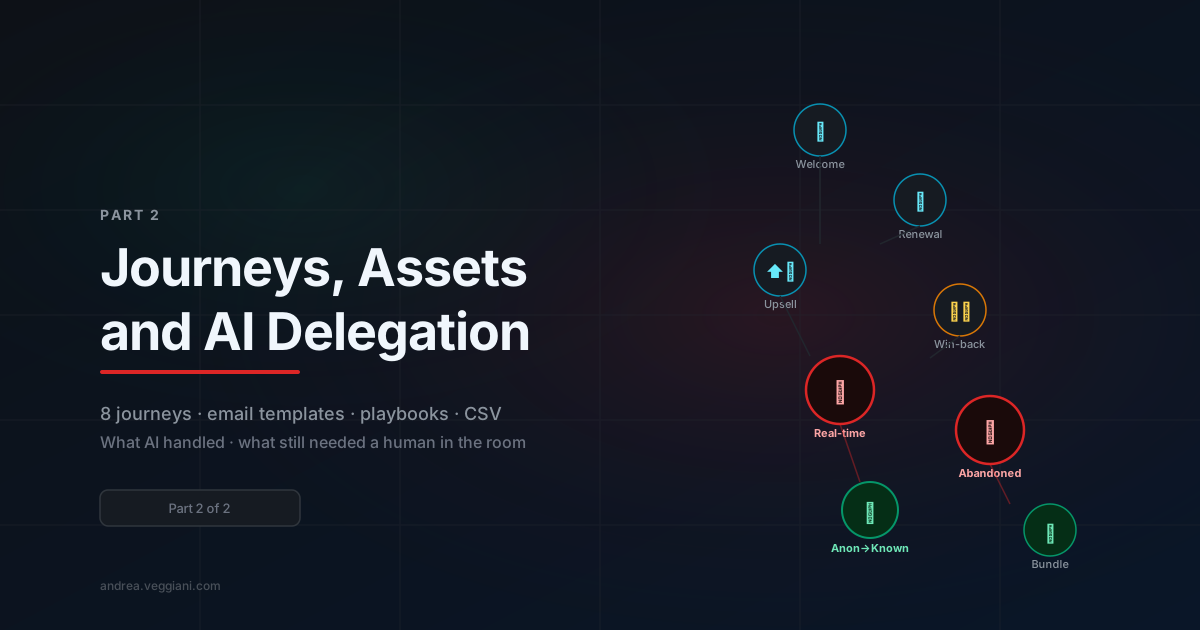
This is Part 2 of a two-part series. Part 1 covers the project brief, the architectural decisions, and how Claude Cowork handled the initial scaffolding. This part is about what came next: the eight journeys, the demo asset kit and an honest assessment of what AI did well and where human judgment turned out to be irreplaceable.
By the time the site was running on Vercel and the Braze SDK was firing events correctly, the hardest part of the technical work was done. What remained was arguably the larger part of the project: the content and configuration layer that turns a working demo site into a demo that actually sells.
That meant eight Braze Canvas configurations. Seven HTML email templates. Canvas blueprints. A 110-user import CSV. A technical playbook. A business case document. None of it particularly difficult in isolation, but the cumulative volume, and the need for everything to be coherent and internally consistent, was where the real complexity lived.
Designing the Journey Architecture
Before building anything in Braze, I needed to decide what the eight journeys were actually demonstrating, not just as product features, but as answers to the specific questions a prospect evaluating a migration from a legacy enterprise marketing automation platform would ask.
The mental model I used: for each journey, what is the legacy platform user’s current workaround, and what does Braze make native?
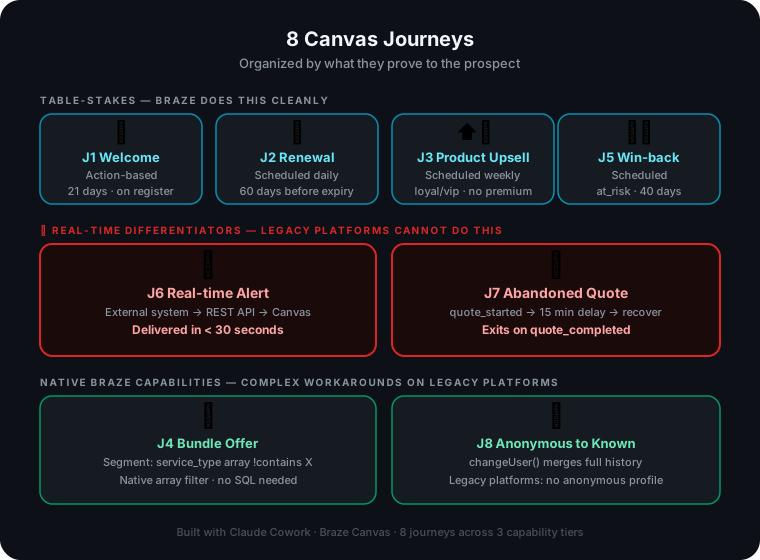
This produced a clear taxonomy. Four journeys are table-stakes, things the legacy platform handles, and Braze does comparably well with less technical overhead:
- J1 Welcome: Standard onboarding after registration. The Braze version is easier to configure and more flexible about channel mixing.
- J2 Renewal: Date-based sequence. Braze’s Canvas date-relative entry makes the configuration cleaner than what legacy platforms typically offer.
- J3 Product Upsell: Segment-based upsell for customers who don’t yet have a specific product. Segment filtering is native in both platforms.
- J5 Win-back: Churn prevention for the
at_risksegment. Standard lifecycle management.
Two journeys are genuine differentiators of things the legacy platform simply cannot do in real-time:
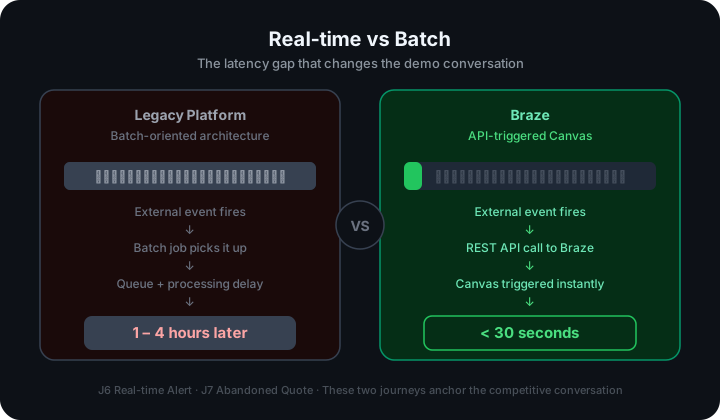
- J6 Real-time Alert: An external system fires a Braze REST API trigger when a monitored threshold is crossed. The Canvas delivers a personalized alert in under 30 seconds. Legacy batch platforms have a minimum latency of one to four hours before queue delays.
- J7 Abandoned Quote: When a user starts the activation form but doesn’t complete it, Braze fires the
quote_startedevent and the Canvas sends the first recovery message within fifteen minutes. A legacy platform would need a scheduled job polling for incomplete sessions.
And two journeys demonstrate capabilities that are conceptually absent from older-generation marketing automation:
- J4 Bundle Offer: Segments users whose
service_typearray does not contain a specific service line. The array attribute type is what makes this elegant. Legacy platforms typically require a custom SQL derivation to express the same filter. - J8 Anonymous to Known: The anonymous-to-known profile merge on
changeUser().
The architecture decision that made all eight journeys work together was defining the custom attributes correctly before configuring any Canvas. Getting customer_segment as a proper enum and service_type as an array, not a comma-separated scalar, was the kind of upstream decision that looks obvious in retrospect but requires deliberate planning upfront. If you get it wrong here, you pay for it everywhere downstream.
J6 and J7: The Moment the Conversation Changes
If you’re running this demo with a technical prospect, Journey 6 and Journey 7 are where the room shifts.
The setup for J6 is simple to describe and striking to witness. You open the demo site, log in as a user with an active service contract, and then call the Braze REST API directly via Postman or a terminal, it doesn’t matter—to fire an external_alert event for that user. Within seconds, the user receives a push notification and an in-app banner appears on the homepage (either immediately or the next time they visit the site). If a ‘ceased alert’ event isn’t sent within an hour, an email is also triggered. The message is fully personalized, referencing their specific contract type and linking to relevant resources.
When you do this in front of someone who has spent years waiting for nightly batch jobs to process, there’s usually a pause. Then: “That’s the same user? From the API call we just made?”
Yes. That’s the point.
The technical implementation is a Canvas with an API-triggered entry condition. The event payload carries properties, in this demo, event_amount, event_unit, contract_type that get referenced in the message templates via Liquid.
J7 works differently. The Canvas uses an action-based entry on the quote_started event, which fires at the first step of the activation form. There’s a delay window of fifteen minutes: if quote_completed fires within that window, the user exits the Canvas without receiving anything. If it doesn’t, the recovery sequence begins.
Fifteen minutes is the right length for a demo, long enough to be believable, short enough to actually trigger during a live walkthrough if you start the form and close the tab. In production you’d extend this to a proper amount of time.
When I asked Claude to produce Canvas blueprints for both journeys, what came back was a structured Markdown document: entry criteria, step-by-step flow descriptions, delay configurations, channel assignments, and example Liquid templates for each message. Some variable names didn’t match the attribute names I’d defined, and the channel mix needed adjustment, but working from a complete draft was significantly faster than starting from a blank configuration screen.
Building the Email Templates
Seven HTML email templates, one per journey. The constraint I set for myself: these need to look like they could actually be sent from the client’s real domain.
That meant matching the brand palette, using the right typography, writing in the client’s local language, and structuring the content around sector-appropriate messaging. The templates are HTML files designed to be pasted directly into Braze’s email editor or used via Connected Content:
<!-- Client brand header with primary color bar and logo -->
<!-- Personalization block: "Ciao {{${first_name}}}," -->
<!-- Main message body with journey-specific content -->
<!-- CTA button -->
<!-- Liquid conditional for contract type -->
<!-- Client-branded footer with unsubscribe link -->
The Liquid personalization pulls from the custom attributes defined in the data model. The J3 upsell template, for example, has a conditional block that shows offer A if a product flag is false, and an alternative upsell if it’s true. That kind of attribute-conditional rendering is one of Braze’s native strengths and it was easy to build into the templates because the attribute model was designed with these use cases in mind from the start.
For each template, I gave Claude the brand guidelines, the journey description, the attribute names and a sample email from the client’s actual website for tone reference. The first drafts were roughly 90% correct; clean HTML structure, right Liquid syntax, coherent messaging.
The pattern that worked: generate first, edit second. Trying to specify everything upfront in the initial prompt produced over-constrained output. Having something complete to react to was faster than trying to describe perfection from scratch.
The 110-User CSV
The demo needed realistic localized users with complete custom attribute profiles, distributed across segments and contract types so that every journey had users who would qualify for it.
I described all the constraints to Claude, specifying users in each customer_segment value, various service_type combinations, upcoming contract_end_date values, and realistic localized names and contact details, and asked for 110 rows in the Braze User Import format. The output was perfect.
The final distribution was deliberate: 30% active, 20% loyal, 15% VIP, 15% new, 10% at-risk, 10% churned. Enough users in each segment to run all eight journeys simultaneously with visible results.
The Docx Layer: Playbook and Business Case
The two Word documents took longer than any other deliverable in the project.
The technical playbook is a step-by-step operational guide for setting up all eight journeys in Braze: how to configure Canvas entry criteria, what segments to create, how to import the demo users, what API endpoints to hit for J6, how to verify everything is firing correctly. It’s the document a sales engineer would use to replicate the demo in a fresh account.
The business case is the same eight journeys, written for a non-technical executive audience, market benchmarks, competitive positioning, a legacy-vs-Braze comparison table with sources, and a section framing real-time capabilities in terms of revenue impact.
The sections that required the most human judgment were the competitive framing and the financial projections. How aggressive to be about the legacy platform’s limitations, how to contextualize market data in a way that’s accurate but useful in a sales conversation, what ROI framing will land with an executive decision-maker, those aren’t prompting problems. They require knowing the audience, understanding the political dynamics of a vendor evaluation, and making judgment calls about what a specific prospect will find credible.
A practical note on usage: projects like this one are usage-heavy by nature. You’re running long scaffolding sessions, iterating on documents, generating templates, debugging deployments all within a compressed timeline. On the Claude Pro plan, that kind of sustained intensive use runs into limits quickly. When you’re under a sales deadline and you hit a reset wall mid-afternoon, it disrupts the flow in a way that’s hard to work around. During this project, Anthropic extended extra usage as a gift, and I’d be dishonest if I said it didn’t matter, it let me push through the final stretch without breaking rhythm. If you’re planning something similar, either pace yourself more deliberately than I did or factor in the possibility that a Pro plan alone may not cover an intensive week-long build without interruption.
What AI Did Well
Looking back across the full project, the pattern is consistent: AI assistance was most valuable at the boundaries between tasks, not within them.
The scaffolding and boilerplate, including the Astro project structure, the dual-backend storage pattern, and the JWT middleware, was substantially faster with Cowork than without. Not because the patterns are complex, but because there’s a fixed cost to setting them up correctly from scratch, and that cost almost entirely disappears when you can describe precisely what you want.
First drafts of structured content followed the same logic. Whether it was email templates, Canvas blueprints, user CSVs, or playbook outlines—having a complete draft to edit was faster than starting from scratch, every time. The 80/20 pattern held consistently, and often felt more like 90/10.
Debugging was genuinely fast. Describing an error message and getting a specific diagnosis worked, and the diagnoses were usually correct. The Vercel adapter issue and the Node.js version conflict in Part 1 were both resolved in minutes.
Research and data surfacing worked well too. The business case required competitive benchmarks and real-time marketing latency data. Claude surfaced the relevant numbers quickly; I verified them before they went into a document a prospect’s technical team would read.
Where Human Judgment Was Irreplaceable
The demo narrative. The eight journeys are not just feature demonstrations; they’re a story. The sequence matters: the onboarding journey grounds the audience, the real-time journeys create the aha moment, the anonymous tracking journey lands as the capstone because it’s the most conceptually surprising. That ordering was a judgment call about what will be persuasive to a specific audience in a specific competitive context. Claude can produce content. It can’t determine what will land.
The data model. Deciding that service_type should be an array attribute required understanding how Canvas segment filters work, how Braze handles multi-value attributes in Liquid, and what edge cases the demo would actually need to cover. It’s the kind of decision that only makes sense to someone who has actually built with the platform.
The language register. Marketing copy in the client’s local language has specific conventions, formality level, tone, the right way to frame product benefits for the sector. Getting this right required reading and rewriting, not just generating.
The competitive framing. Every claim about the legacy platform’s limitations had to be defensible. Not aggressive enough and the comparison table is unconvincing. Too aggressive and a technical buyer who knows the incumbent tool will dismiss the document entirely. Finding that calibration is not a prompting problem.
The Bigger Pattern
There’s a version of this project that would have taken at least two weeks without AI assistance. The site, the journey configurations, the email templates, the documents, none of it is technically difficult, but the total volume is substantial.
With Cowork, it took about three days of focused work. Not because AI wrote everything, but because the scaffolding time, the first-draft time, the debugging time and the research time were all dramatically compressed. The time I spent was mostly on decisions that require the kind of judgment you build over years in a domain.
The principle I keep coming back to: AI compresses the distance between knowing what to build and having built it. The gap it doesn’t close and shouldn’t be expected to close, is knowing what to build in the first place.
For this project, knowing what to build meant understanding the prospect’s specific objections to migration, the technical limitations of their current platform, the market context and the competitive dynamics of the CEP vendor landscape. None of that came from AI. All of it informed the structure, content, and emphasis of everything the AI helped produce.
The AI handled everything between ‘I know what I need’ and ‘I need it to exist.’ That is the proper division of labor, a more honest description of where these tools are genuinely useful than most current discourse allows, at least for now.
One More Thing
When I wrote about building my personal site, I said the most interesting part was rediscovering the satisfaction of building something directly. I still think that’s true. But this project added a dimension that a personal site doesn’t have: building something that has to be convincing to someone else, under time pressure, in a domain where the details matter.
That’s a different kind of work. It requires the same hands-on engagement, but it also requires holding a very specific audience in mind at every step, a technical buyer who knows their current platform well and has legitimate reasons to be skeptical about migration.
The demo works not because of the code or the email templates or the document formatting. It works because the eight journeys are structured around a specific competitive argument, the data model supports the most sophisticated journeys natively, and the real-time capabilities are presented in a context that makes their significance immediately obvious to someone who has lived with batch-processing constraints for years.
That architecture, not the technical one but the argumentative one, was what the whole thing was built around. And that’s the part that still needs a human in the room.
The full technical stack is Astro 6.x SSR, Vercel KV (Upstash Redis), JWT auth via jose, and Braze Web SDK 6.x. All infographics in this series were generated as SVG files during the same Cowork session that built the project.