10 min read
This is the follow-up to What a Weekend with Astro and Claude Cowork Taught Me About Building Again. If you haven’t read that one, the short version is: I spent a weekend rebuilding my personal site with Astro and Vercel using Claude Cowork as an implementation partner, and I found the experience genuinely useful. So I kept going.
A few weeks after I published that article, I had a different kind of project sitting on my desk.
I needed to build a sales demo for a prospect evaluation. The target was a large enterprise client: a major B2C company running a legacy enterprise marketing automation platform. I made a deliberate choice about how to approach it.
I did not want to show Braze through a slideshow or a static sandbox. I wanted to show it through a working site: something the prospect could actually click through, that would fire real SDK events, populate real user profiles, and feed real journeys.
That was my call, and my responsibility, because I believe this is the most effective way to make the value of a modern customer engagement platform visible to a serious buyer.
The scope was larger than a personal website. It needed authentication, a user area, multi-step forms, custom event tracking, anonymous user handling, and a production deployment that didn’t break. It also needed to be done fast, within a sales timeline rather than a product roadmap.
This is the story of how I designed that demo, the architectural decisions behind it and how I used Claude Cowork to compress the implementation effort enough to ship it inside a sales timeline.
Why a Demo Site and Not a Sandbox
Before getting into the technical choices, it’s worth clarifying what a “Braze demo site” means in a sales context.
Most CEP vendor demos follow the same pattern: a pre-loaded dashboard and a few hypothetical scenarios. That approach is fine for a first conversation. But for sophisticated buyers, especially those evaluating a migration from a legacy platform, I do not think it is enough.
My view was simple: if the real differentiator is behavioral, event-driven, and architectural, then the demo has to make those things visible. A dashboard can describe that value. A working site can demonstrate it.
That is why I chose this route. It was more work, certainly, but in my judgment it was the clearest way to transmit value to the prospect.
The client’s technical team would ask specific questions. How does Braze handle anonymous users who have not logged in yet? What happens to their history when they finally authenticate? How quickly does the platform react to an external trigger from a connected system compared with the batch schedules that legacy enterprise marketing automation tools typically run on?
These are questions you can’t answer convincingly with a dashboard walkthrough. You need to show the actual behavior. That meant building something that behaves like a real site: pages, sessions, login, forms, a customer area, event tracking at each meaningful interaction.
The result was a demo site styled after the client’s public-facing website, with eight distinct customer journeys designed to highlight specific Braze capabilities.
This was not just a technical implementation decision. It was a presales design decision, and I owned it end to end: the format of the demo, the architectural trade-offs behind it, and ultimately whether it would succeed in making the platform’s value legible to the prospect.
The Technical Brief
Before writing a single line of code, I needed to be clear about what the project actually required. This is where architecture discipline pays off, even when you’re building alone: you do not start implementing until you understand the boundaries.
In practice, the requirements broke down into four layers.
The site layer: A publicly accessible website styled after the client’s real brand — with pages for offers, a contact form with newsletter subscription, a multi-step activation/quote form, and a protected customer area behind authentication.
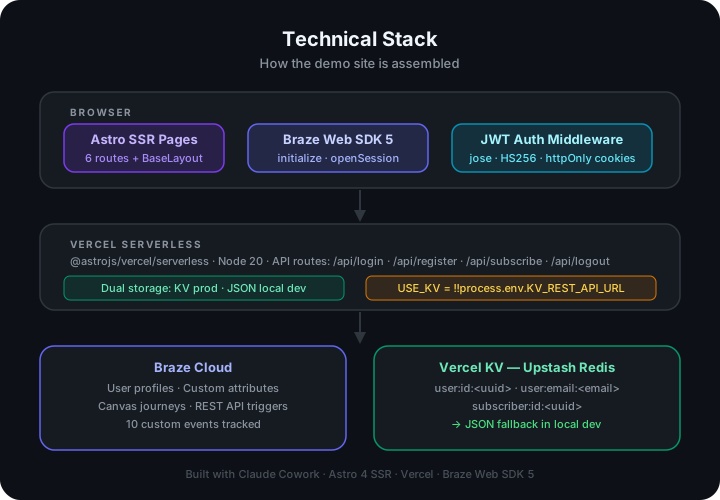
The data layer: User registration and login with JWT-based session management. Two storage backends: a file-based JSON fallback for local development, and Vercel KV (backed by Upstash Redis) for production. Custom user attributes that map to Braze’s data model: service_type, contract_type, customer_segment, and a set of product-specific boolean flags.
The Braze layer: The Web SDK initialized on every page load to track anonymous sessions, with changeUser() called only at specific identity transition points — login, registration, newsletter subscription. Custom events fired at each meaningful interaction across the funnel.
The demo assets layer: Beyond the site itself, I needed a complete set of demo materials: HTML email templates for each journey, Canvas blueprint configurations, a user import CSV with realistic localized demo profiles, a technical playbook, and a business case document.
That last category, the documents, was where the project’s scope really multiplied. Building the site was one thing. Producing a complete demo kit that a sales team could actually use was another.
Why Astro Again
When I built my personal site, I chose Astro because it fit the use case: a mostly-static content site where JavaScript should be the exception, not the default. For this project, the reasoning was different.
Astro with SSR mode gave me something specific: server-side rendering with API routes in a single framework, deployable to Vercel as a serverless function. I didn’t need a separate Express backend or a decoupled API layer. The authentication middleware, the KV storage calls, the form processing; all of it lives inside the same Astro project, colocated with the pages that use it.
This matters when you’re building fast and alone. Every additional repository, every additional service, every additional deployment is a coordination cost. Keeping it all in one place meant I could iterate without context-switching.
The trade-off is that Astro’s SSR mode is less battle-tested than its static mode, and the documentation for edge cases, particularly around Vercel adapter quirks, is thinner than you’d want. I hit a couple of those edges. More on that shortly.
The Braze SDK Pattern I Settled On
The most important architectural decision in this project had nothing to do with the framework. It was about how to initialize Braze correctly for a demo that needed to show anonymous user tracking as a first-class feature.
Most Braze Web SDK integrations I’ve seen in the wild make the same mistake: they call initialize() once at app startup and then call changeUser() on every page load if there’s a logged-in user. This creates a subtle problem. Between the initialize() call and the changeUser() call, there’s a window where events might be attributed to the wrong session state.
The pattern I settled on is this:
// In BaseLayout.astro — runs on every page load
braze.initialize(apiKey, { baseUrl: endpoint });
braze.openSession();
// No changeUser() here. Anonymous tracking starts immediately.
// Only in three places: login, registration, newsletter subscribe
braze.changeUser(userId);
This means every page load starts a clean anonymous session. Braze tracks the anonymous user's behavior natively. When identity is established login, registration, or even just a newsletter signup, `changeUser()` merges that anonymous history into the identified user profile.
In demo terms, this is exactly what I needed. Journey 8 is built around this pattern entirely. A visitor browses, subscribes to the newsletter (triggering changeUser() with their email as the ID), and their entire pre-subscription behavior is suddenly attributable. No data loss. No “before we knew who they were” gap.
This is exactly the kind of capability older-generation enterprise marketing automation tools struggle to reproduce cleanly, because anonymous behavioral continuity was never native to how those systems were designed. And it is also exactly the kind of difference that becomes much easier to explain when the prospect can see it in a working system.
How Claude Cowork Handled the Scaffolding
Once I had decided that the demo needed to be a working site, and once the identity model, event design, storage approach, and deployment constraints were clear, Claude became genuinely useful as an implementation accelerator.
But the key decisions were upstream of that. The important choice was not “can AI scaffold this?” The important choice was “what kind of demo best communicates value to this prospect?”
The first thing I did was describe the full project to Claude: the site structure, the authentication pattern, the dual-backend storage requirement, and the Braze SDK initialization logic. Not as a formal specification, but as a conversation, the way you would brief a developer who had just joined the project.
What came back was a working Astro scaffold with the right pieces already in place: middleware for route protection, auth utilities, dual-backend storage logic, the Braze initialization pattern in the base layout, and the main identity transition points already wired correctly.
The scaffold wasn’t perfect. There were a few import path issues, and the Vercel adapter wasn’t configured correctly (it defaulted to @astrojs/node rather than @astrojs/vercel/serverless). But “not perfect” and “working foundation in thirty minutes” is a very different situation than starting from zero.
What I noticed, building this as compared to the personal site, was that the quality of the output scaled with the quality of the input. When I described the storage pattern in detail — “dual-backend, check for the KV env var, async everywhere, Redis keys in the format user:email:<email>” — the generated code matched that spec closely. When I was vague, the code was generic and needed more correction.
The practical Cowork hint here: treat your first prompt as a technical brief, not a casual request. The more constraints you specify upfront, naming conventions, env vars, SDK versions, expected error handling, the less correction you do later.
The Deployment Friction
Every project has some deployment friction. This one had two clear examples.
The first: Vercel 404s on all non-root routes after the initial deploy. The cause was the wrong adapter — @astrojs/node doesn’t produce a Vercel-compatible output. Switching to @astrojs/vercel/serverless in astro.config.mjs fixed it. A fifteen-minute problem, but one that would have taken longer if I hadn’t been able to describe the symptom to Claude and get a diagnosis within seconds.
The second: Vercel rejecting the deployment because it tried to use Node.js 18.x, which Vercel deprecated. The fix was adding "engines": {"node": "20.x"} to package.json. Again: not a hard problem once you know what it is, but another reminder that deployment infrastructure has its own sharp edges.
Both incidents followed the same pattern: something broke, I described the error output to Claude, got a likely diagnosis and fix, applied it, and moved on. This is where AI assistance becomes genuinely valuable in implementation work, not in generating code from nothing, but in shortening the gap between a problem appearing and a plausible fix becoming clear.
What the Site Actually Looks Like
The finished site has six main sections:
Homepage — Banner for the client’s core products and add-ons. Each banner links to the activation form with the relevant offer pre-selected via URL parameter.
Offers — Full offer listing with filtering by product category.
Activation — A five-step multistep form: product type → service details (address, account identifiers, current provider) → personal data → payment method → confirmation. Each step fires a Braze custom event with the relevant payload. Products that require a site survey rather than direct activation use a separate completion event — isQuote: true.
Contact — A contact form with a newsletter subscription option. Subscribing triggers changeUser() and fires newsletter_subscribed with source and interest tags.
Customer Area — The protected area, accessible after login. Includes a preferences page where users can update their service preferences and product flags — all written back to Braze as custom attributes.
Login / Registration — Standard forms. Registration fires user_registered and calls changeUser(). Login fires user_login.
The site is deliberately not overengineered for the demo context. It doesn’t need to handle edge cases that a production platform would need like full consent management, real payment processing, account validation. It needs to be convincing enough that a technical buyer can see the data flowing correctly into Braze.
The Data Model Decision
One of the more important design choices was the attribute model, because the journeys only work cleanly when the underlying data structure does.
Some attributes are simple scalars: contract_type (residential/business), a premium tier flag (boolean), customer_segment (an enum: new/active/loyal/vip/at_risk/churned). Others are arrays, because a customer might hold multiple service lines simultaneously: service_type and newsletter_interests.
The array attributes matter for journey segmentation. Journey 4 targets users whose service_type array does not contain a specific service line. You can’t express that filter on a scalar field. Getting this right upfront meant that the Canvas configurations I built later could reference real, filterable attributes rather than requiring workarounds.
The Cowork hint for data modeling: describe your segment logic before you define your attributes. Work backward from “who do I need to find” to “what data do I need to store.” Claude is useful here for pressure-testing the model, describe a journey’s entry criteria in plain language and ask whether the proposed attribute structure can express it. That conversation often surfaces edge cases you would otherwise discover only later, while configuring the journey in the platform.
What’s Coming in Part 2
Part 2 goes into the operational layer: the eight journeys themselves, the demo asset kit around them, and the places where AI genuinely accelerated the work and where it did not.
The most interesting examples are Journey 6 and Journey 7, because they make the competitive argument visible in the clearest way. Real-time, event-driven behavior is easy to claim in a slide. It is much harder to fake in a working system.
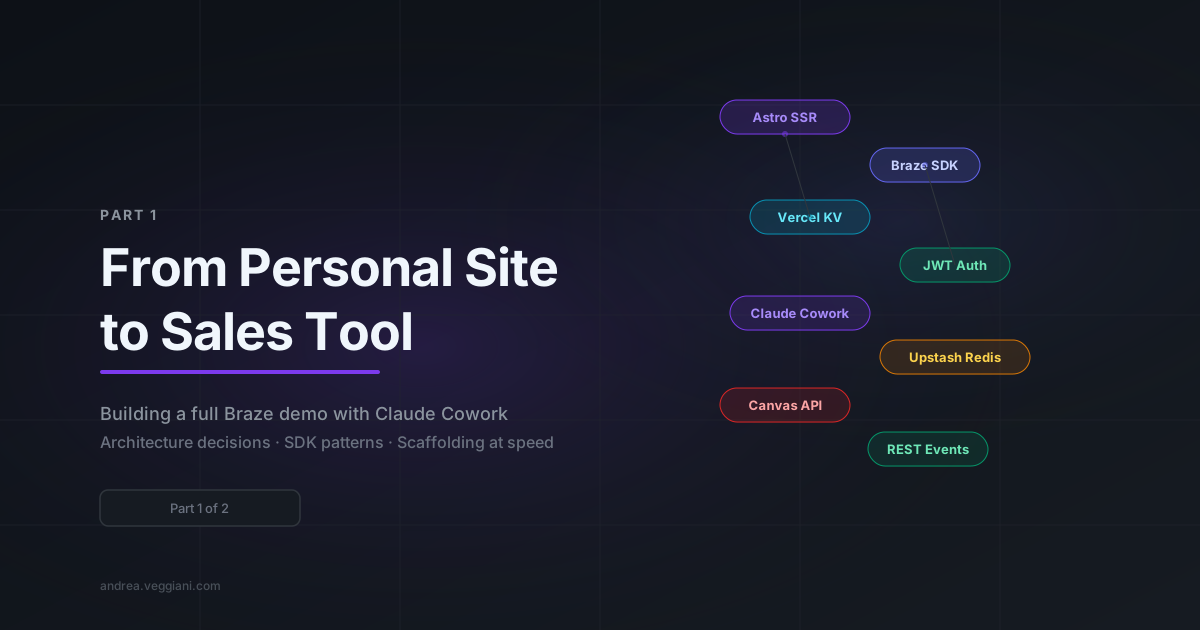
The technical stack is Astro 6.x SSR, Vercel KV, JWT auth via jose, and Braze Web SDK 6.x.